LinkedIn Outreach + Cold Email CRM for B2B Agencies
Run LinkedIn sequences and cold email campaigns in one sequence builder, manage every reply in one CRM, and follow up from your phone. Built for agencies.
7-day trial, card required · cancel any time
TL;DR
- →One sequence editor handles both LinkedIn steps and email steps — a reply on either channel stops the sequence.
- →Every reply lands in one CRM so your team isn't switching between LinkedIn and email inboxes.
- →Built for agencies: client workspaces keep each client's sequences, contacts, and pipeline separate.
One sequence across LinkedIn and email
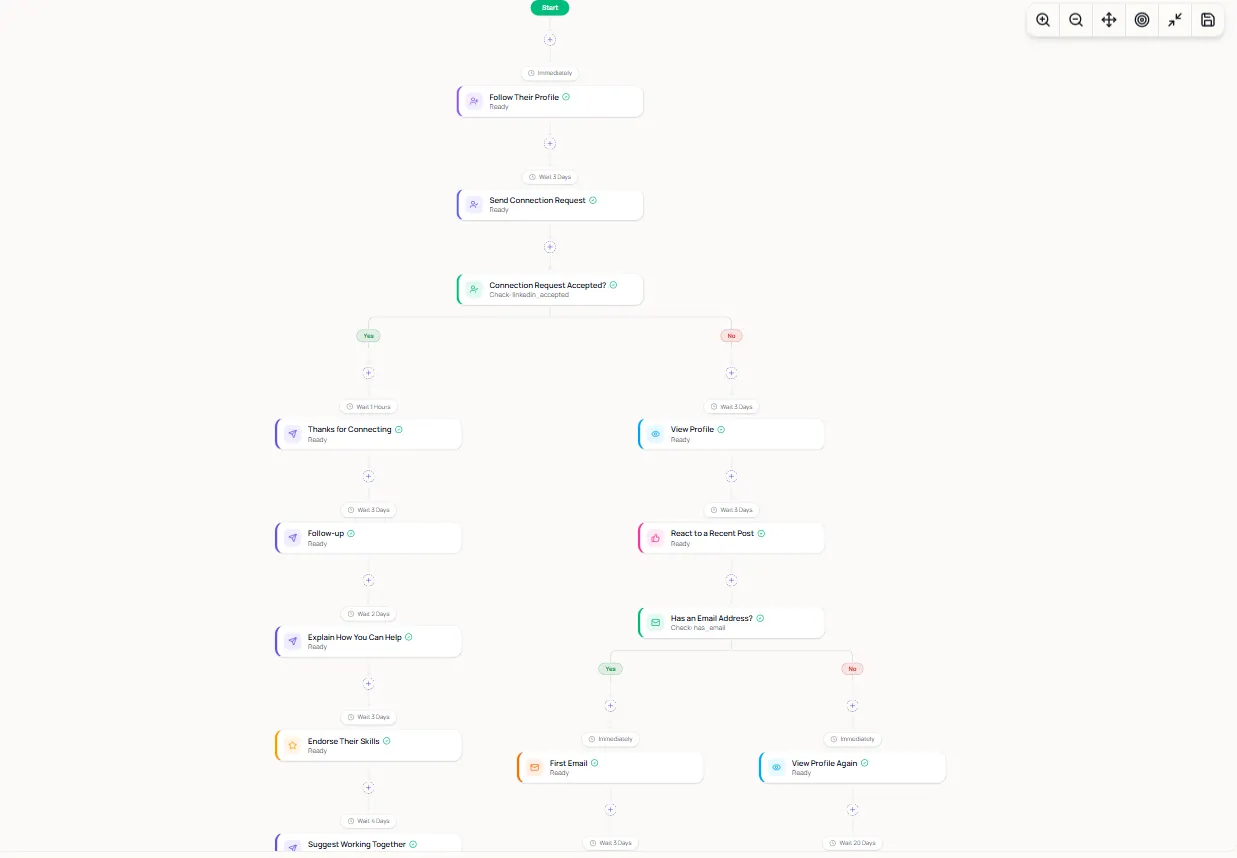
Most tools separate LinkedIn outreach from cold email — you build two campaigns and manually coordinate them. In Reachvo, one sequence editor handles both. Add a LinkedIn connection request, a LinkedIn message, an email step, and a follow-up — all in the same sequence, in the order you want them.
A sequence might look like:
- LinkedIn connection request
- Wait 2 days
- LinkedIn message if connected
- Wait 3 days
- Cold email if no reply
- Follow-up email at day 10 if still no reply
That logic lives in one place. When you edit the sequence, you edit all of it.
A reply on any channel pauses the sequence
When a prospect replies to the LinkedIn message on day 2, Reachvo stops the sequence. The cold email step on day 5 doesn't send. The follow-up on day 10 doesn't send.
This isn't a setting you configure — it's how the sequence logic works for every campaign.
If you use separate tools for LinkedIn and email, this coordination is a manual step. Someone replies on LinkedIn, and unless you remember to pause the email campaign, they receive a cold email from someone they already responded to.
Full conversation history in CRM
Every LinkedIn message and email sent or received in a sequence appears in the contact's CRM record. You see the full thread — not just one channel — in one view.
When a reply comes in, you have context. You can see what was sent on LinkedIn before the email, and what the prospect said in response to each step.
Deals and pipelines
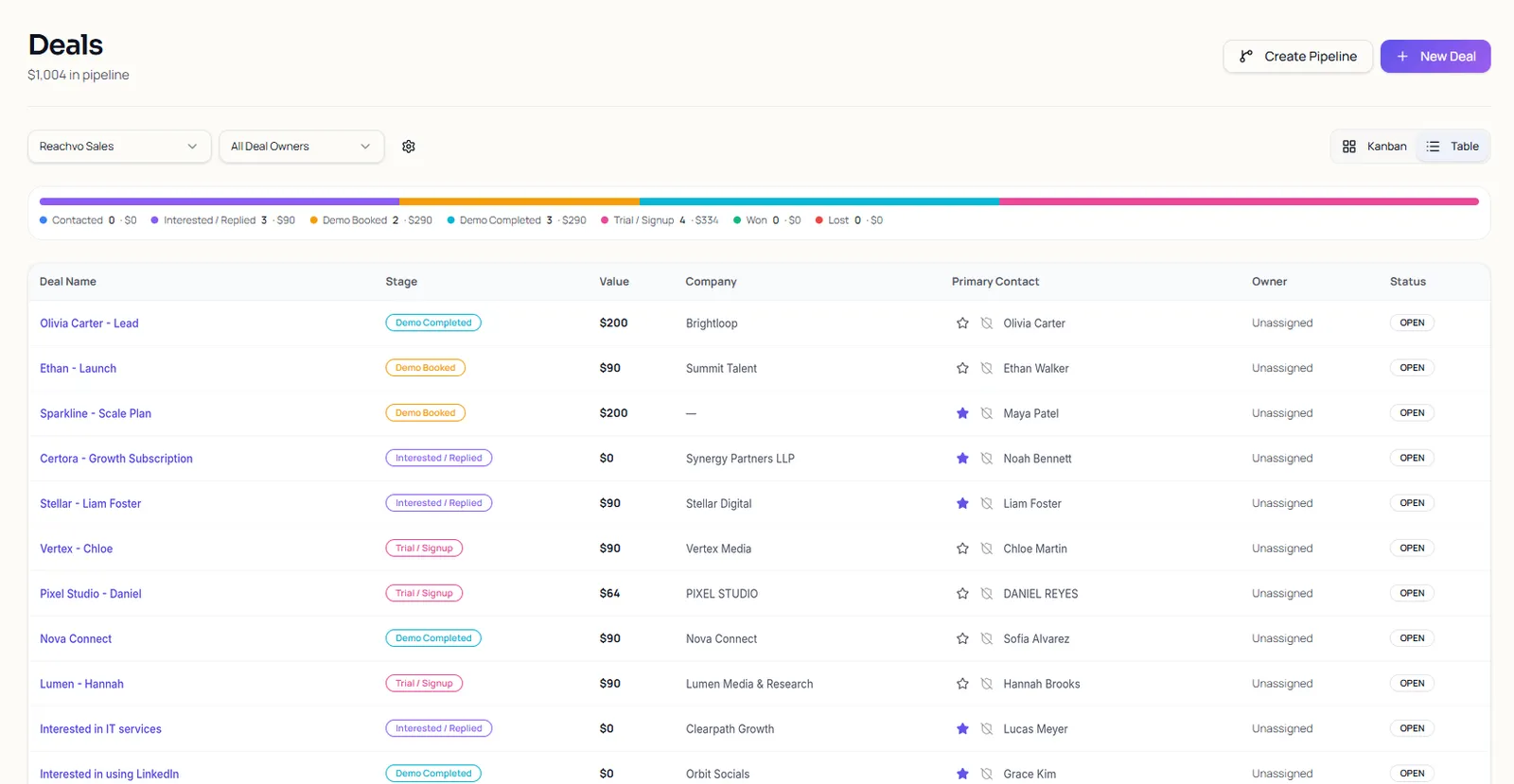
Contacts that reply or convert move into CRM pipelines. Create pipeline stages that match your sales process — initial reply, qualification call booked, proposal sent, closed. Move deals between stages manually or set up triggers.
Each client workspace has its own pipeline. If you're an agency managing multiple clients, each client's deals are isolated in their workspace — a contact in Client A's pipeline can't be confused with Client B's contacts.
See /solutions/agencies for how agency workspaces and pipelines work together.
Reply from mobile
When a prospect replies to a LinkedIn message, you get a push notification on your phone. Open the Reachvo mobile app to read the full context — the sequence history, the contact's profile, previous messages — and reply directly from the app.
The mobile app is available on iOS and Android. It's for follow-up and inbox management. Campaign setup and admin are web-only.
Frequently asked questions
Does a reply on LinkedIn stop the email step? Yes. A reply on either channel — LinkedIn or email — stops the sequence for that contact. You won't send a cold email to someone who already replied on LinkedIn.
Can I see LinkedIn messages and email threads in the same view? Yes. The contact's CRM record shows conversation history from both channels in one timeline.
What happens if a prospect connects on LinkedIn but doesn't reply to the message? The sequence continues. Only a reply stops it. You can configure a separate branch for connected-but-not-replied contacts if you want a different follow-up path.
Can I run sequences for multiple clients in one workspace? Client workspaces on Scale and Agency plans keep each client's contacts, inboxes, and LinkedIn accounts isolated. Run sequences for Client A and Client B from the same agency login without data mixing.
Is the LinkedIn outreach within account protection limits? Yes. Reachvo enforces 25 connection requests per day and 100 per week for every LinkedIn account on every plan. These are account protection limits — they're fixed and cannot be changed.
Does Reachvo include email warmup? Yes. Email warmup is included on every paid plan. Warmup inboxes match the number of connected email inboxes on your plan. No separate subscription.
Compare tools: Reachvo vs lemlist · Reachvo vs HeyReach · Best multichannel outreach platforms for agencies